SAVR RECIPES
Making Delicious Moments Easy!

MOBILE APP DESIGN
MY ROLE
UX/UI Designer
SCOPE
GV Design Sprint (modified version)
TIMELINE
Dec 2024 (5 days)
TOOLS
Figma, Miro, Chat GPT, Notion AI


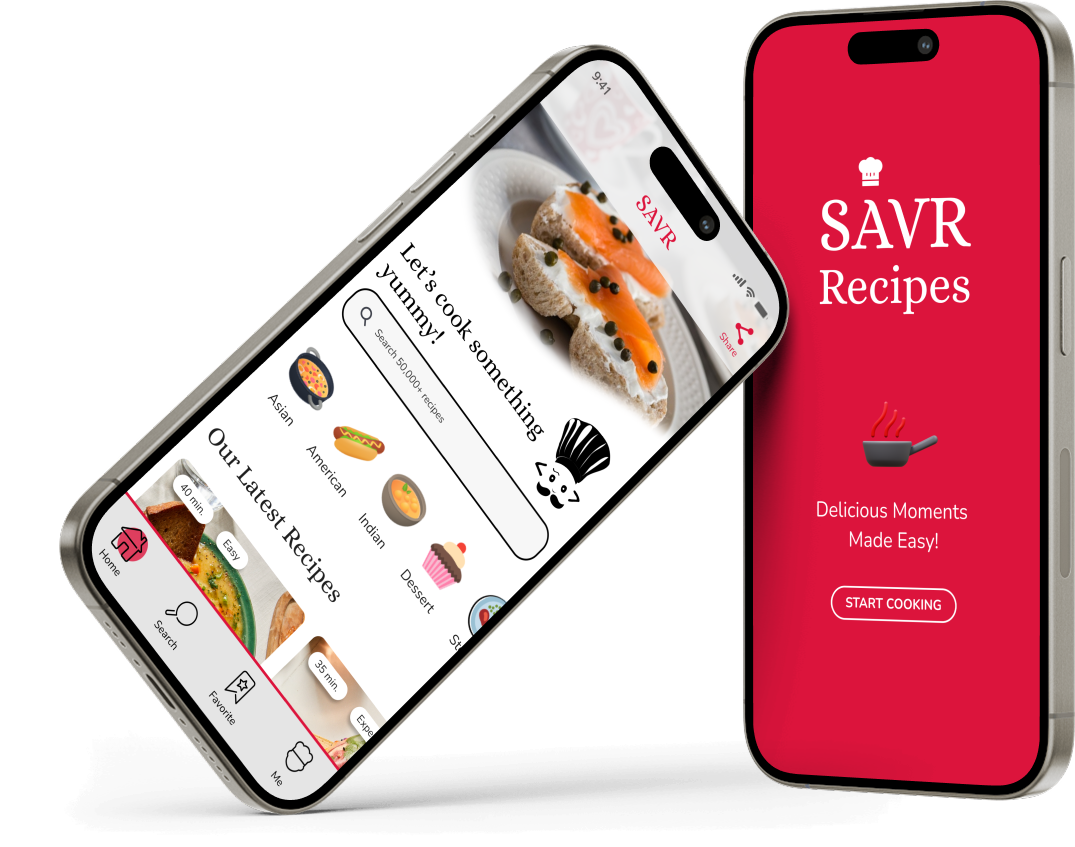
Savr Recipes is a mobile app that shows thousands of recipes and cooking tips for at-home chefs. It was specially designed to help people follow cooking instructions easily and accurately to make a dish successfully.


MY ROLE
MY CONTRIBUTIONS
Project Lead of the Design Sprint
Savr Recipes is a Google Ventures Design Sprint I started with a startup kit including user research highlights. During the 5-day sprint project, I was in charge of:

Analyzing research data
Identifying the user pain points and the business goals, mapping end-to-end User Journey

Interaction & UI designs
Lightning demo, Crazy 8’s ideating & sketching, Storyboarding, High-fidelity mockups, Interactive prototype

Validating designs
Usability testing
THE PROBLEM
THE BACKGROUND & GOALS
Users didn’t feel the cooking instructions were clear and easy to follow to successfully make their food
Savr Recipes is a native mobile app that shows thousands of recipes and cooking tips for at-home chefs. The app also lets users rate and review recipes for other users. While Savr got a lot of feedback from users about finding quality recipes, recently, they had some negative reviews related to meal preparation. More specifically, many people were disappointed with the cooking results because they didn’t feel the instructions were clear and easy to execute to make their food successfully.
Therefore, Savr wants to provide users with a better experience when it’s time to cook by helping users accurately and easily follow the cooking instructions.
User Insights

THE PROBLEMS
How might we support users through the cooking process so that they can make their cooking time Easy and Successful?
I was responsible for creating solutions to adapt to the above-mentioned critical user needs, helping them feel confident when it’s time to cook and successfully make the food by easily following the cooking instructions in the Savr app. In other words, I focused on enhancing the user experience when they find a recipe in Savr app and start cooking.
HERE’S HOW I DEFINED MY CHALLENGE
Based on the user research data, I understood that the biggest problem users were facing was that they felt that the cooking instructions were not clear and easy enough to follow, and that’s why they didn’t successfully create their food.
To concentrate my efforts on enhancing the users’ cooking experience, I asked myself: After choosing a recipe and opening its instructions, what does an at-home chef do until a dish is completed? I noticed that for a dish to be made successfully, everything (i.e. ingredients, tools, techniques, etc.) needs to be prepared before chefs start cooking, chefs need to confirm if they are on the right track at different points of the whole cooking process, and more… So, how can I optimize those experiences?
My challenge was to incorporate end-to-end supports that make everything easy for at-home chefs to cook after they open a recipe, including helping them BEFORE, DURING, and AFTER the cooking process because the research revealed 3 significant themes that came up frequently:
01
Before cooking
Users want to be prepared beforehand
02
During cooking
Users want to know if they are on the right track and put everything together smoothly to save time
03
After cooking
Users want to know how to improve next time if the final dish does not come out as expected
THE SOLUTION
Want to explore my Design Process first?
MY SOLUTIONS
Savr Recipes App: making your cooking time Easy and Successful with full support “Before”, “During”, and “After” the cooking process!
I focused on enhancing the user experience by addressing the 3 key challenges mentioned above:
- Helping users be prepared BEFORE starting cooking
- Helping users stay on track and save time DURING the cooking process
- Helping users learn for improvements AFTER cooking


01
Theme #1: Before cooking – Help me Be Prepared beforehand!
CHALLENGE:
Users get stressed out or have to rush because sometimes things were not prepared beforehand, and that made the food fail (i.e. Recipe requires ingredients or tools they didn’t have in the kitchen or technique they weren’t familiar with, etc.)
SOLUTIONS:
- Introducing the “Let’s Prepare” section to help users prepare everything before they start cooking, including listing all necessary Ingredients and Utensils, and informing users of Cooking Techniques used in the recipes that might be new to them.
02
Theme #2: During the cooking process – Let me know I’m On The Right Track and Save Me Time!
CHALLENGE:
During the cooking time, users are not sure if they are on the right track at different points of the cooking process. They also feel that timing everything together and using time efficiently is stressful.
SOLUTIONS:
- Videos and Photos show users what each step should look like, ensuring they’re on the right track.
- “Am I on the right track?” Tips guide users to do things correctly, especially at important points of the process that might affect the final food’s result.
- “Want to save time” Tips help users put everything together smoothly and save time efficiently.
- The Convenient Built-in Alarm Feature helps users set cooking time easily without switching apps. This helps save their time and prevent mistakes.
- Tickable Step-by-step Cooking Instructions* let users mark what they’ve done, easily follow the whole process (especially with long or complicated recipes) and avoid mistakes.


03
Theme #3: After cooking – Help me Improve Next Time if my food fails!
CHALLENGE:
If a dish doesn’t come out as expected, users don’t know what went wrong or how to improve it next time.
SOLUTIONS:
- Introducing the “Pro-Tips” section with advice from experts. This helps users notice what could go wrong during their cooking process.
- “My Private Notes” section on each recipe lets users jot down important points for improvements, and is convenient to access in their next attempt.
- The Community Connection feature helps users improve their cooking by getting help and advice from other at-home chefs.
INTERACTIVE PROTOTYPE
Let’s try out the interactive prototype to get a real feel for my solutions…
DESIGN PROCESS
Want to jump right into my Design Solutions?
Here’s how I developed the design solutions mentioned above…
Click the tabs below for details of my design process.
THE METHODOLOGY – GOOGLE VENTURE DESIGN SPRINT
THE METHODOLOGY
Google Venture Design Sprint (modified version)
I ultilized the Google Venture Design Sprint methodology modified for solo designer, combining it with the Design Thinking mindset, to fulfill this 5-day project. After understanding the problems and empathizing with users, I jumped right into imagining possible solutions from Day 1.

DAY 1 – UNDERSTANDING
DAY 1 – UNDERSTANDING & MAPPING
Research HIGHLIGHTS
In-depth user interview data revealed insights, pain points, and needs about the existing experience of at-home chefs when cooking a new recipe using a cooking app
During the discovery phase of my project, I was given interview highlights from 8 individuals. At the interviews, users were asked
“Tell us about your experience cooking a new recipe for the first time.”

COMBINING SIMILAR THEMES
To define the problems that needed to be solved, I organized and synthesized the interview findings into themes
The research data revealed the similarity of pain points and needs among multiple users that they want to be supported BEFORE, DURING, and even AFTER the cooking process.
01
BEFORE
Want to know everything they need before starting to cook
02
DURING
Want to be on the right track at different points of the cooking process
Want to put everything together smoothly and save time if possible
03
AFTER
Want to learn something if the food does not come out as expected so that they can improve next time
This enabled me to incorporate an end-to-end support that make everything easy for my users to cook:
Open a recipe, and get support BEFORE, DURING, and AFTER your cooking process!
USER PERSONA

PROBLEM STATEMENTS
How might we help users to confidently and easily follow the cooking instructions when they cook a new recipe?
When it’s time to cook, there are 3 phases: Before, During, and After. So I asked myself more detailed questions…
BEFORE
How might we help users be prepared beforehand so that they feel confident when starting the cooking process and avoid rush and mistakes?
DURING
How might we help users know they are on the right track and time everything together smoothly through their cooking process?
AFTER
How might we help users learn and improve if a dish doesn’t come out as expected?
USER JOURNEY MAP
Mapping the end-to-end experience users will have after opening a recipe with my initial ideations immersed.
To jump right into imagining possible solutions, I draw a map of possible end-to-end experiences users will have when using my app. I named the user on the left, listed the goal they would like to achieve while using the product on the right, and filled in the steps that the users would need to take to achieve that goal. I also immersed my initial ideas for a solution into the map, such as what they need to prepare after they find and open a recipe, what could happen after they start cooking, or what could happen after a dish is prepared. The map helped me focus on the most critical part of the user experience I wanted to improve.

My sketched map and a digital version with more details

DAY 2 – LIGHTENING DEMO & SKETCHING
DAY 2 – LIGHTENING DEMO & SKETCHING
LIGHTENING DEMO
Quick market research to get inspired
To find solutions that I’d like to be inspired by, improve, or experiment with, I conducted a lightning demo by looking at solutions competitors have produced to help users easily and accurately follow instructions on a recipe to successfully make a food. I get inspired and gathered a large amount of information from 4 apps: Epicurious, Yummly, Kitchen Stories, and NYT Cooking.
Key Insights:
I found that while the cooking apps have good solutions that I can learn from (i.e. Epicurious and NYT Cooking let users add notes after cooking, Kitchen Stories helps users prepare kitchenware before starting and implement a built-in cooking timer right on to the recipe page, Yummy gives users a checklist of ingredients so they can easily organize them, etc.), they still remain UI/UX issues same as Savr Recipes’s (there are still things making it hard to accurately and easily follow the cooking instructions). I understood this was a chance for me to mix, match, incorporate my new ideas and improve.
Some screenshots of the products I’ve researched & the reason why I selected them:

CRAZY 8’s
Identifying the most crucial moment of my users’ experience
I referred back to the user journey map created on Day 1 and decided which moment/screen was the most critical for my users. While selecting the most critical screen, I asked myself: At which step will the user complete the primary activity (cooking) to reach their goal (successfully preparing a dish)? Which screen is most important for solving this problem?
Because our problem was users failed to accurately and easily follow the cooking instructions, reading the instructions and following them to cook is the most crucial moment, and improving the cooking instructions page is the key! Therefore, I focused on improving the screen of cooking instructions.
Rapidly sketching out solutions for the most critical screen
I utilized the Crazy 8s method and set a timer for 8 minutes and sketched out 8 different solutions/variations to the most critical screen for quick experimentation and idea generation.

SOLUTION SKETCH
Voting for the best solution (from the Crazy 8s)
It was time to select one of the Crazy 8s sketches of the critical screen. I chose solution No.4 because I think it can help organize everything and it shows what users need to read on one page, without asking them to click back and forth. This one-page design is extremely important because users do not want to touch their phones while cooking, based on what I’ve learned from the research data.
Creating a 3-panel-board solution sketch
I re-created the best solution sketch (No. 4) in a bit more detail to clearly show my immersed solutions (RED dots). After that, I sketched out a 3-panel-board solution sketch, which worked as a tiny storyboard, showing the most critical moments of the user experience:
- Screen 1: How users access the cooking instructions page from the home page
- Screen 2 (the most critical screen): How users can interact with the app to easily and successfully cook a dish (the RED dots show my immersed solutions)
- Screen 3: What happens after users complete the cooking process.

DAY 3 – STORYBOARDING
DAY 3 – STORYBOARDING
FULL STORYBOARD (SKETCHED WIREFRAMES)
Finalizing my design decisions by creating a full storyboard
Based on the tiny storyboard of the most critical screens created on Day 2, I created a full storyboard to finalize my end-to-end designs. The storyboard below worked as a lightweight, sketched wireframe that I would use to build your prototype on Day 4 of this sprint, so I included all the necessary UI elements that I would need to build my prototype on each screen.
Besides the main features on the cooking instructions page, I included the timer screen showing what users see when they click to set up a cooking alarm, and the brief intro carousel to show a more complete experience.

DAY 4 – HI-FI MOCKUPS & PROTOTYPING
DAY 4 – HI-FI MOCKUPS & PROTOTYPING
HIGH-FIDELITY SCREENS
Designing full support for my users through their whole cooking time
On the fourth day of the design sprint, I used Figma to create high-fidelity screens for the Savr Recipes app, based on the sketched wireframes created on Day 3. These high-fidelity screens depict the red route of using the app’s cooking instructions page to easily and successfully make a dish.


INTERACTIVE PROTOTYPE
Providing a realistic experience to users when they try my app
Among my solutions, some new features require users to interact to feel how they help improve their experience, such as the built-in timer or the tickable step-by-step instruction design, thus an interactive prototype was crucial to my project. During the usability testing phase, I intended to ask users to imagine that they are in the kitchen, use my app to cook a recipe, and give me feedback on their thoughts and feelings on the solution ideas.
DAY 5 – VALIDATION
DAY 5 – VALIDATION
USABILITY TESTS
Testing Method
- I conducted moderated usability tests with 5 participants. Each participant session lasted about 30 minutes. Participants all have cooking experience using a mobile cooking app.
- 1 task and 5 open questions were asked and their feedback was noted during the sessions.
- Before giving users the tasks and questions, I provided them with some context about the app. After that, I asked them to open a recipe and imagine that they were in the kitchen and were using that recipe to cook, then let them read through that recipe and freely explore the app as if they were cooking.
My Goals
- The primary goal was to see if users felt they were fully supported during the entire cooking time (before starting cooking, during the cooking process, and after the dish was completed). Therefore, I got feedback mainly via open questions.
- There were 2 features in the app that users could interact with, that were the built-in timer and the tickable instructions. I wanted to test if users were able to notice and use the built-in timer.
- Identifying potential problems: Regarding the tickable instruction, as every solution could present a new problem, I was aware of a challenge that some users might not want to tick every step after it’s done simply because they don’t want to touch their phone many times when cooking. Therefore, I aimed to provide the tickable instruction as a convenient feature for those who need it to organize their cooking steps, but did not consider it as a task users must successfully complete when using my app.
THE KEY TASKS & QUESTIONS
Asking the participants to complete 1 task and answer 5 open questions
- (Question) Did users feel they were prepared enough before starting the cooking process? And Why?
- (Question) Did users feel confident and know if they were on the right track halfway through the cooking process? And Why?
- (Question) Did the instructions on the recipe help users put everything together smoothly and save time? (Explain in detail…)
- (Task) Set a cooking alarm
- (Question) Did users notice and use the tickable feature in the instructions (If YES, what did they think about it?)
- (Question) Did the recipe make users feel they can learn and improve next time? And Why?
KEY FINDINGS
Successful Outcomes Achieved – Testing was successful with 5/5 participants completing all tasks and providing positive feedback! All participants did not struggle with any specific section or task.


Before Cooking: Be Prepared Beforehand
- 5/5 satisfied with the provided solutions
- Found the “Let’s Prepare” section helpful (especially, Utensils & Cooking Techniques)
- 1 participant suggested that the total cooking time could be more detailed (for seasoning, preparation, baking, resting, etc.)


During Cooking: Know That I’m On The Right Track & Put Everything Together Smoothly
- 5/5 satisfied with the provided solutions
- 5/5 completed tasks successfully
- Found the step-by-step instructions very clear and easy to follow
- Appreciated the “Am I on the right track” tips
- Appreciated the “Want to save time?” tips
- Found Videos & Photos super helpful
- Found the built-in timer very convenient for saving time
- Found the instructions’s tickable design helpful because it helped them easily track where they were and wouldn’t get lost in texts.


After Cooking: Learn & Improve Next Time
- 5/5 satisfied with the provided solutions
- Found the Pro-Tips section helpful
- Appreciated the My Private Notes section (easily leave notes in one app and quickly access them next time)
- Liked the Community Connection feature for helping them connect and learn from other chefs
USER FEEDBACK
Overall, users had good experiences with how the Savr Recipes app would help them easily and accurately follow cooking instructions to make a dish successfully.

THE TAKEAWAY
SUCCESS
100% Task Success Rate & 100% User Satisfaction!
Sarv Recipes is a mobile cooking app designed to help people easily and accurately follow the cooking instructions on each recipe to make food successfully. I was successful in delivering the app design which has
- 100% Task Success Rate, meaning all users were able to complete tasks and use the product as intended.
- 100% User Satisfaction with the solutions provided in the app (i.e. instructions on preparation beforehand, video/photo-based instructions, “Am I on the right track” tips, “Want to save time?” Tips, built-in timer, tickable design for instruction steps, Pro-tips, private notes section, etc.)
LEARNINGS
Learnings from the Design Sprint
- Time Constraints & Agile Focus: The rapid Google Ventures design sprint demanded quick adaptation and a laser focus on essential user-centered design principles. This experience honed my research and design skills, emphasizing efficient, user-friendly solutions under tight deadlines.
- Valuing User Insights: Usability tests revealed the unexpected value of the Community Connection feature. User feedback highlighted its potential as a learning tool, demonstrating how attentive listening transforms ideas into effective solutions.
NEXT STEPS
If I had additional time, I would…
Adding new features that will benefit both users and businesses, such as
- Clarifying the details of the total time needed to complete a recipe (for seasoning, preparation, baking, resting, etc.)
- Adding details about the Q & A (Community Connection) and Reviews sections
- Adding a section for users to connect with each recipe’s owner.