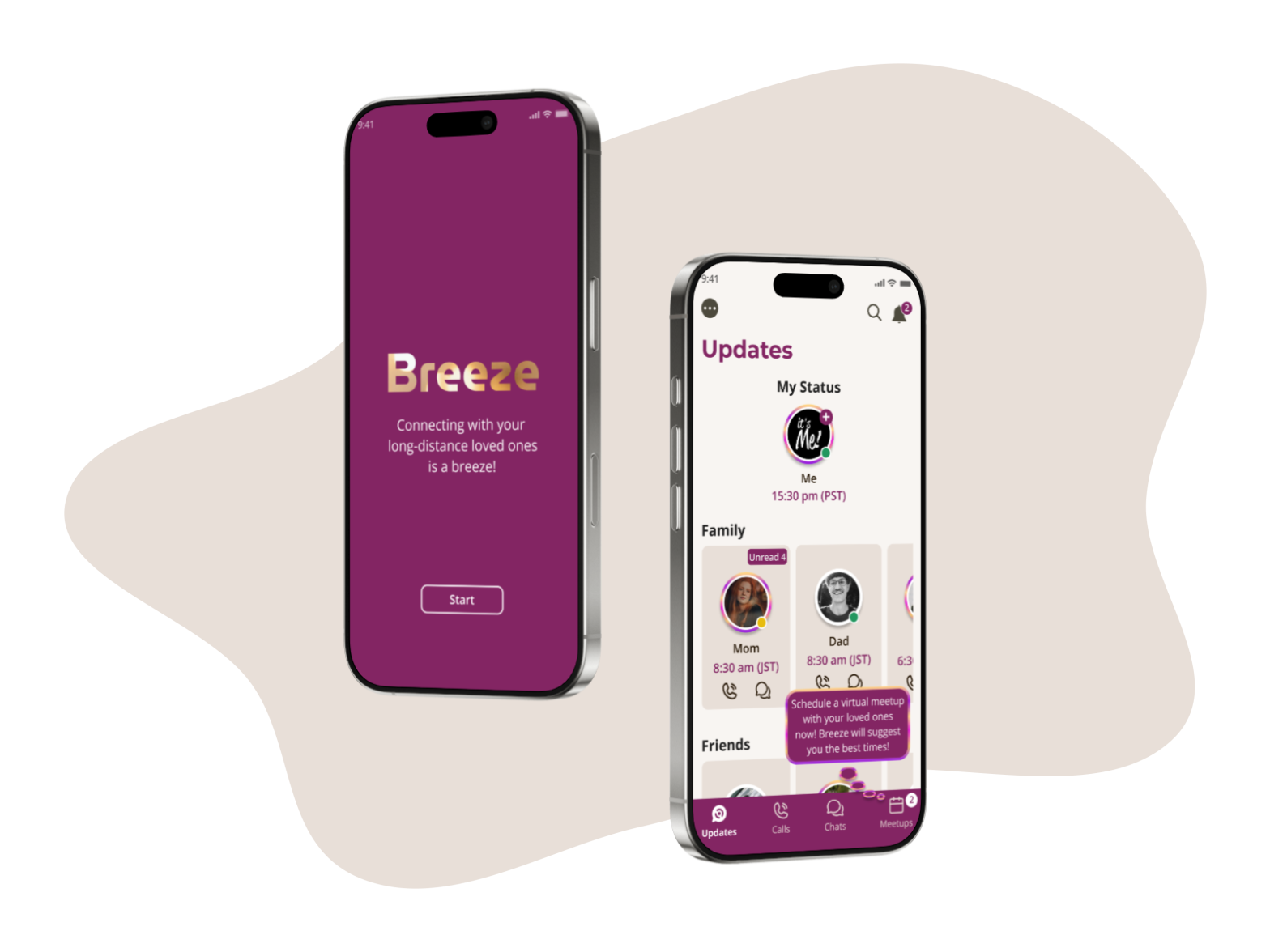
Breeze is an AI-driven mobile messaging app that enables users to easily and responsively connect with loved ones worldwide, regardless of time zone differences.
MY ROLE
MY CONTRIBUTIONS
Project Lead of the end-to-end design process
I led the design of Breeze in July 2024. During the 16-week project, as a solo designer, I was in charge of implementing the end-to-end design process including:
Research
Conducting research and analyzing data about users and competitors to identify user needs and market demands.
UX & UI Designs
User story map, user flows, information architecture, sketching, wireframes, style guide, hi-fi mockups, prototypes
Validation & Iteration
Conducting 2 rounds of usability tests.
Improving the app based on user feedback
THE PROBLEM
THE BACKGROUND & GOALS
People experience difficulties when contacting loved ones across different time zones.
“We have a family chat group on a messaging app with my parents in Japan, my brother in Canada, and myself. Scheduling online meetups is always a challenge. I recall having to constantly Google time zone conversions just to find a potential meeting time. Trying to mentally calculate the differences is exhausting. Then, we’d go back and forth, repeating the time zone conversions until we found a mutual time. It was incredibly frustrating. I kept thinking there had to be an easier way…”
-Maki (California, USA)
About a year ago, my friend Maki shared a story about the frustrating, time-consuming process of scheduling virtual gatherings with her family abroad, shortly after she arrived in the USA. This isn’t unique to Maki; many people I know face similar challenges connecting with loved ones overseas. I experience this myself, struggling to stay connected with family and friends across time zones. Despite trying various messaging apps, I found they didn’t fully address the time zone issue, a gap confirmed by my research.
That’s why this topic sparked my interest:
How can we help people overcome common challenges when connecting with loved ones across multiple time zones?
Let’s design an AI-powered messaging app that offers a seamless, time-zone-friendly communication experience!
My Design Approach: The 5Ws & 1H
WHY
Why is this important?
DETAILS
Studies have highlighted the challenges people face when communicating across time zones, indicating that this is a prevalent situation.
Solving this problem will benefit any business
WHO
Who are we designing for?
DETAILS
People who have loved one living far away, particularly in different time zones
WHEN
When do they use it?
DETAILS
When they want to contact their loved ones
Could be anytime in a day
WHERE
Where are they physically?
DETAILS
Could be anywhere across the globe
WHAT
What the design will be?
DETAILS
AI-powered messaging app
Enabling effortless cross-time zone communication
HOW
How do I design? How to measure success?
DETAILS
Research
Problem statements
Ideations (User stories, Mapping, MVP, App map, User flows)
Design (Sketches, Wireframes, Prototype)
Testing
THE PROBLEMS
How might we help people connect with their loved ones easily regardless of the time-zone differences?
Through user research, I gained valuable insights into the challenges people face when connecting with family and friends across multiple time zones. A significant pain point was the inability of current messaging apps to effectively manage time zone differences. This resulted in several key issues:
Time zone confusion & Uncertainty about availability: The manual conversion of times is a frustrating and time-consuming experience. Also, determining a loved one’s availability for calls or chats across large time zone gaps is challenging due to time zone confusion.
Difficulty scheduling cross-time-zone group meetings: Users struggle to coordinate meetings with loved ones in varying time zones.
Desire for more responsive communication: Users find text-based communication insufficient for maintaining close, long-distance relationships, as they desire more real-time interaction.
My objective was to explore how AI could enhance cross-time-zone communication with loved ones. The user research highlighted 3 key themes related to time zone differences, which became the project’s primary focus:
01
Availability& Local Time
How might we create a system that proactively informs users of their loved ones’ potential availability and local time?
02
Cross-time-zoneGroup Meetups
How might we empower users to effortlessly plan group gatherings across multiple time zones?
03
Responsive Messaging
How might we create a messaging experience that is more personalized and responsive to enhance the feeling of presence and connection?
Breeze Messaging App: AI-Driven Time Zone Support is the Key!
With the 3 key challenges in mind, I integrated solutions into the app’s four main sections: Updates, Calls, Chats, and Meetups (These sections were determined by user needs identified through research).
Helping users effortlessly plan group gatherings across multiple time zones
Proactively informing users of their loved ones’ potential availability
Users found that determining a loved one’s availability for calls or chats across large time zone gaps is challenging due to time-zone confusion.
SOLUTION:
Displaying personalized availability and local times of loved ones, tailored to each user:
AI automatically displays loved ones’ potential availability across Updates, Calls, Chats, and other relevant sections.
Additionally, loved ones’ local time is shown to aid in determining availability.
HOW IT HELPS:
Knowing potential availability and reducing time-zone confusion could reduce cognitive load, increase message rates, and improve user engagement.
Displaying personalized availability and local times of loved ones, tailored to each user, within key areas of the app.
Displaying personalized availability and local times of loved ones, tailored to each user, within key areas of the app.
02
Theme #2: Cross-time-zone Group Meetups
PROBLEM:
Users struggled to coordinate meetings with loved ones across time zones (i.e., frustrated by the need for manual time conversions and endless back-and-forth messaging)
SOLUTION:
Introducing the new AI-powered ‘Meetups’ feature with automated scheduling, helping users effortlessly schedule cross-time zone meetups in a few clicks: Users just need to select members and a time frame. The app’s AI will automatically suggest mutually agreeable times for all participants.
HOW IT HELPS:
Designed an intuitive interface that reduced cognitive load and allowed users to connect with loved ones 30% faster (based on usability testing)
A pop-up displayed upon launching the app helps users discover the unique Meetups feature.
The Meetups feature enables users to schedule cross-time zone meetups in just a few clicks, leveraging AI automation.
03
Theme #3: Responsive Messaging
PROBLEM:
Users find text-based communication insufficient for maintaining close, long-distance relationships, as they desire more responsive communication.
SOLUTION:
Introducing the personalized estimated response time notifications feature: The app sends users personalized notifications of estimated response times from their chat partners, providing a more responsive messaging experience.
HOW IT HELPS:
Personalized and responsive notifications would encourage users to stay active on the platform and improve user engagement.
Providing estimated response time notifications.
Providing estimated response time notifications.
INTERACTIVE PROTOTYPE
Let’s try out the interactive prototype to get a real feel for my solutions…
Here’s how I developed the design solutions mentioned above…
Click the tabs below for details of my design process.
THE METHODOLOGY
THE METHODOLOGY
Combining User-Centered Design Process & Design Thinking Mindset
I followed the User-Centered Design (UCD) process, combining it with the Design Thinking mindset, to fulfill this project. Throughout my design process, I covered almost every type of deliverable that is possible within the UX space. After empathizing with users and defining the problems, I created a lot of ideas that are possible to solve the issues. This forced me to go back to the Empathy phase to get a deeper understanding of my users, in order to make decisions for the MVP. Also, the arrows that are going from Ideate phase to Prototype phase, then Testing phase, and then back to Ideate phase of the design process ended up going into a loop for a while, because after a prototype was created, I conducted user tests such as guerilla testing or usability testing, then went back and came up with some new ideas, and repeated this many times until the design was finalized. The Design Thinking mindset was combined into the UCD design process, making it an in-depth project.
SECONDARY RESEARCH (Competitor Analysis, Competitive Heuristic Evaluation)
COMPETITOR ANALYSIS, HEURISTIC EVALUATION
Understanding The Problem Space…
To better understand the space in which I’m working and how comparable messaging apps have tried to help users connect with their long-distance loved ones, I utilized AI tools such as Chat GPT to conduct Secondary Research and Competitor Analysis. I also conducted a Competitive Heuristic Evaluation, using NNG’s heuristic principles, to analyze the usability strengths & weaknesses of the 3 leading competitors: WhatsApp, Facebook Messenger, and Signal.
A part of the Competitive Heuristic EvaluationA part of the Competitive Heuristic Evaluation
Competitor Analysis
KEY INSIGHTS:
None of the competitors provides optimal solutions for time zone difference issues
Among hundreds of messaging apps available globally, the ones in the table below are the most popular for casual communications.
While WhatsApp displays the ‘last seen’ local time and Skype shows the chat partner’s local time, none of the messaging apps provides optimal solutions for time zone difference issues, such as time zone conversion and cross-time zone meetup scheduling, which Maki and others have experienced.
Furthermore, the Heuristic Evaluation revealed design flaws and areas for improvement in responsiveness and user control, even among these global-leading messaging apps.
The insights gained reinforced my original assumptions regarding user challenges in cross-time zone communication and motivated me to explore improvements to the user experience.
PRIMARY RESEARCH (Screener Survey, User Interviews, Affinity Map, Empathy Map, Personas)
PRIMARY RESEARCH (USER INTERVIEWS)
Understanding My Users’ Needs & Pain Points
Research Plan
Creating a roadmap to efficiently accomplish my research goals
My research goals were to understand the pain points and expectations of people connecting with loved ones in different time zones. To achieve this, I developed a research plan outlining goals, methods, timeline, potential participants, and key research questions. This plan helped identify prospective users, brainstorm key learnings, and served as a roadmap throughout the research process.
To gather valuable user insights, it was essential to interview potential Breeze app users. Therefore, I conducted a screener survey to identify ideal participants who met the desired demographic:
Having family/friends living in different time zones
Experiencing difficulties connecting with loved ones
Identifying Pain Points & Needs from real potential users
I conducted 30-question interviews covering various aspects of long-distance communication. Recognizing the challenges faced by individuals with geographically distant loved ones, I focused on their pain points, goals, needs, expectations, and motivations. I also gathered demographic information, details about current tools and methods, and insights into their personalities to gain a comprehensive understanding of their experiences.
User Insights
-Anonymous User
It really should be easier to plan a virtual family meetup…
Seriously, getting the family together is a whole thing. We’re always chatting back and forth, trying to find a time. It just eats up so much time.
-Anonymous User
I wish I knew my family’s availability at a glance
I need to see my family’s availability easily. Time zone differences make it a guessing game when to call. So frustrating!
-Anonymous User
I feel uncertainty when sending messages…
Honestly, texting gives me major uncertainty. You hit send, and have no idea when you’ll hear back. It feels so unresponsive… And I definitely start to worry if they don’t answer fast…
-Anonymous User
I just want to know what time it is for my friends!
If a messaging app could just show me my overseas friends’ time, it’d make everything so much easier!
AFFINITY MAPPING
Analyzing data to identify the major problems users are facing
To analyze the user interview data, I used the Affinity Mapping method to categorize the findings into logical groups. This process helped identify key issues and reveal two distinct user types:
User Profile 1: Time Zone Management Difficulties – The first user profile encounters difficulties with time zone differences, necessitating manual scheduling of meetups, which is a protracted process involving extensive communication. They also frequently perform manual time conversions and lack visibility into their loved ones’ availability for calls or chats.
User Type 2: Uncertainty and Responsiveness Concerns. The second user profile experiences challenges related to uncertainty and a lack of responsiveness resulting from time zone differences. They perceive texting as abstract and inadequate for long-distance communication due to the absence of predictable response times. They seek greater responsiveness and personalization to foster a stronger sense of connection with their loved ones.
EMPATHY MAP
Connecting with my users’ feelings and emotions
To gain a deeper understanding of the users’ environments and connect with their feelings, thoughts, emotions, and behaviors (THINK & FEEL, SAY & DO), I developed two Empathy Maps, one for each user type. These maps enabled me to empathize more effectively with the users, providing insights into their pain points, expectations, and motivations when connecting with loved ones, and allowing for a more nuanced identification of issues.
PERSONAS
Visualizing My Target Users
Based on user research, it was clear that Breeze had two distinct user types. To visualize these target users, I created two Personas. These Personas guided my design decisions throughout the process, and their diverse behaviors, pain points, and needs informed a variety of beneficial solutions.
LENA represents users who struggle with Time Zone Management Difficulties. She must manually schedule meetups, a time-consuming process. Due to time zone differences, she also manually converts times and lacks insight into her loved ones’ availability for calls or chats
MIKE represents users who experience Uncertainty and Responsiveness Concerns in cross-time zone communication. He finds texting abstract and unrealistic due to the unpredictable response times.
RESEARCH HIGHLIGHTS
KEY INSIGHTS
3 major issues related to “Time-Zone Differences”
Based on user interview responses, Affinity Map trends, and Empathy Map insights, I narrowed down the problems to 3 major issues common to all users:
KEY INSIGHTS
01
Time zone confusion & Uncertainty about availability
The manual conversion of times is a frustrating and time-consuming experience. Also, determining a loved one’s availability for calls or chats across large time zone gaps is challenging due to time zone confusion.
02
Difficulty scheduling cross-time-zone group meetings
Users struggle to coordinate meetings with loved ones in varying time zones.
03
The desire for more responsive communication
Users find text-based communication insufficient for maintaining close, long-distance relationships, as they desire more real-time interaction.
These findings aligned with the Competitor Analysis and Heuristic Evaluation, which revealed a lack of cross-time zone communication solutions in current messaging apps. Addressing the three identified issues became the primary mission of my app, ensuring user needs remained central to the design.
PROBLEM STATEMENTS (How Might We questions)
PROBLEM STATEMENTS
How might we help people connect with their loved ones easily regardless of the time-zone differences?
To concentrate on the three primary challenges and facilitate idea generation for user solutions, I developed the following ‘How Might We…’ questions. This approach allowed me to reframe the key insights into actionable opportunity areas and ensure a consistent focus on the core objectives throughout the remaining design phases.
HOW MIGHT WE?
01
Availability& Local Time
How might we create a system that proactively informs users of their loved ones’ potential availability and local time?
02
Cross-time-zoneGroup Meetups
How might we empower users to effortlessly plan group gatherings across multiple time zones?
03
Responsive Messaging
How might we create a messaging experience that is more personalized and responsive to enhance the feeling of presence and connection?
INITIAL IDEATIONS (User Stories, Story Mapping, MVP, Information Architecture, User Flows)
INITIAL IDEATIONS
Ideating and Organizing Ideas for a Minimum Viable Product (MVP)
INFORMATION ARCHITECTURE/ APP MAP
Determining the 4 main sections of the Breeze app
Through user interviews, I discovered that calling, texting, and receiving updates were essential messaging app features for all participants. This directly informed my decision to include Updates, Calls, and Chats as core sections of Breeze. Additionally, I heard user feedback highlighting the time-consuming and frustrating nature of manually scheduling meetups across time zones. This led me to introduce the Meetups feature, simplifying cross-time zone scheduling. These insights directly shaped the initial structure of Breeze, which I designed with four main sections: Updates, Calls, Chats, and Meetups.
USER STORIES & STORY MAPPING
User Stories – Brainstorming how my users would use the Breeze app.
I employed divergent thinking techniques and conducted a brainstorming session to generate User Stories, illustrating how users would navigate the app to achieve their goals and needs. This process enhanced my understanding of user behavior and ensured a user-centered design approach.
Story Mapping – Determining the most crucial user stories that should be included in the Minimum Viable Product (MVP).
I determined the priority of user stories by evaluating their impact on users’ major goals, needs, and pain points. Stories classified as ‘Priority 1,’ indicating their necessity for the MVP, were incorporated into a User Story Map. This map provided a critical foundation for the subsequent development of user flows, enabling me to concentrate on the most impactful solutions for users.
USER FLOWS
Visualizing Step-By-Step How Users Move Through My App To Contact Their Loved Ones
Based on the User Story Map, I developed the major User Flows for the app, incorporating those crucial user stories. The User Flows helped visualize step-by-step the red routes or major actions users take, in other words, the main screens they can through when using the Breeze app.
VIEW DETAILS OF THE USER FLOWS
FEATURE 1 – UPDATES: Users can complete these goals: Viewing new updates from their loved ones, Accessing the old updates, and Posting their updates.
FEATURE 2 – CALLS: Users can complete these goals: Making an audio/ video call, and Being informed before a call starts.
FEATURE 3 – CHATS: Users can complete these goals: Sending messages to their loved ones, and Being informed of the estimated time to receive a response.
FEATURE 4 – MEETUPS: Users can complete these goals: Scheduling a cross-time zone meetup, Joining a meetup, Managing the scheduled meetups (keep or cancel), and Answering invitations of meetups received from other people.
Approaching the design by illustrating preliminary screen layouts
The User Flows facilitated the creation of preliminary pen-and-paper designs for the major screens. I integrated solutions into these sketches to address the three key problem areas: potential availability and local time, cross-time zone meetup scheduling, and responsive messaging. These rough sketches provided a framework for organizing information and developing more refined screens in subsequent stages
Establishing the foundation design and interactions of Breeze with 4 main flows and detailed elements
Following initial guerrilla testing on sketches to confirm the app’s foundational structure, I utilized Figma to develop mid-fidelity wireframes featuring precise layouts, consistent components, and comprehensive content and functionalities. I then created Wireflows to illustrate screen connections and user interactions. These wireframes and wireflows provided a solid foundation for the app’s design and interactions, facilitating the subsequent creation of visually refined high-fidelity mockups.
UI Design: Warmth, Intimacy, and Trust are The Keys!
MOOD BOARD
Evoking the essence of Breeze: Warmth, Intimacy, and Trust
As Breeze is a mobile app designed to foster connections with loved ones, I aimed for a tone of warmth, intimacy, and trust. To achieve this, I created a mood board with color palettes, typography, icons, images, illustrations, and UI/UX interface elements that conveyed the app’s essence. This mood board served as inspiration for visual elements and helped me align the emotional tone of my designs with the users’ desired experience.
VIEW THE KEY POINTS OF MY MOOD BOARD
COLOR PALETTE: Use soft, warm colors like pastels to evoke feelings of warmth, trust, and friendliness; vibrant accents to add energy & joy; and muted tones to avoid overwhelming.
TYPOGRAPHY: The font combination should evoke feelings of friendliness and warmth yet be neutral, clear, and highly readable for an inviting, easy-to-use interface because Breeze is a messaging app.
ICONS, BUTTONS: Should have rounded corners to feel approachable and non-intimidating.
IMAGES, ILLUSTRATIONS: Might use shadows on images to create realistic effects; Might use images of real people’s faces on login or splash screen to create realistic & friendly effects; Might use sticker-style illustrations to convey a sense of fun and closeness.
I then created a Style Guide to establish visual standards and principles for Breeze, ensuring that all design elements of the app remain cohesive and aligned with the desired tone and mood. The interface should be clean and highly readable while representing the brand attributes: Warmth, Intimacy, and Trust. Below are the key justifications for my visual design decisions.
VIEW MY JUSTIFICATIONS FOR THE VISUAL DESIGN DECISIONS
TYPOGRAPHY: I chose Montserrat font for the biggest headings (the names of the pages), and Open Sans Font for other smaller headings & body texts. Montserrat font has a sleek, geometric design that feels modern, approachable, and personable, which can create a friendly and inviting atmosphere for the app. Open Sans font is well-known for its clean, modern, and highly readable design. It has a neutral yet friendly appearance, which creates a welcoming UI without being too formal. The combination is ideal for an app centered around close and personal connections like BREEZE.
COLOR PALETTE: I considered color psychology to decide the primary color for the app. The Primary color is a deep, muted purple with red undertones, which can convey a sense of warmth and intimacy. Especially, the muted nature of this particular shade can enhance that feeling by being more subdued and less formal, while the richness of this shade can also evoke a sense of trust and reliability. It is paired with a soft, warm light beige background which helps enhance the feelings of warmth & trust. The light tone of the background creates a calm and welcoming atmosphere, which is ideal for fostering close relationships with family/ friends. Dark grey shades are used for Texts. The texts were tested and it showed that they passed the WCAG requirements at both AA and AAA levels, meaning they have enough contrast against the backgrounds for readability and accessibility.
ICONS, BUTTONS, TEXT BUBBLES, NOTIFICATIONS: They all have rounded corners, which make the designs approachable, friendly, and non-intimidating.
IMAGES: For messaging apps, there are not many images like other types of apps, the only images are the user avatars. I used sticker style for the avatars to create some sense of fun, informality, and closeness, helping users feel comfortable for casual chats with family & friends. I also use shadows on avatars, making them stand out from the background, to create more realistic effects and make them less formal.
LOCAL TIME: Time zone display is one of the main features of this app, so the local times are featured with the Primary Color to make them more noticeable to users.
VALIDATION (Usability Tests, Iteration)
VALIDATION
2 Rounds of Usability Testing and Design Iterations
Following the completion of the high-fidelity UI design, I developed an interactive prototype for Breeze and created a test plan for efficient usability testing.
I conducted two rounds of moderated usability tests, each involving 5 participants. Participants were tasked with completing 10 specific tasks and answering 2 open questions. This process aimed to verify the intended functionality of the app’s main features, understand user reactions to the new features, and uncover any usability issues.
ROUND #1
Key Findings: It was hard for users to notice the Availability Dots and the Meetups Feature!
AVAILABILITY DOTS(MAJOR): Users struggled to notice or understand the meaning of the Availability Dots.
MEETUPS FEATURE(MAJOR): Some users initially had difficulty noticing and using the Meetups feature due to its novelty.
OTHER MINOR UI ISSUES(MINOR = Extra suggestions for a better UI even though users were able to complete the tasks): Unclear meaning of the broken purple avatar border (users guessed it indicated active posting); Ambiguity regarding AM/PM for displayed local times (users were able to infer); Request for host name display in meeting headers.
Round #1 – Task Success Rate: 83% ~ 92%
ITERATION #1: THE 3 major improvements of my designs based on the user feedback of Round #1:
01
Issue 1: Users struggled to notice or understand the meaning of the Availability Dots.
BEFORE:
The dots were at the top right
No explanation of their meaning
AFTER:
Changed the position of the dots to the bottom right of the avatars
Made the dots bigger
Explained the meaning of the dots on the onboarding screen
02
Issue 2: Some users initially had difficulty noticing and using the Meetups feature due to its novelty.
BEFORE:
No tooltip or guidance about this new feature
AFTER:
Made this brand new Meetups feature more noticeable by adding an animated pop-up as guidance.
03
Issue 3: Other minor suggestions for a better UI
BEFORE:
Not sure exactly about the meaning of the broken purple border around the avatars
Not sure exactly if the local time is AM or PM (they were able to guess though!)
Users wanted to see the host’s name on the header of each meeting’s headline
AFTER:
Changed the borders of avatars back to the common pattern (rainbow color)
After the iteration, I retested the app to confirm if the issues uncovered in Round #1 were resolved. In Round #2, generally, the app got POSITIVE FEEDBACK:
Task Success Rate: 100% – All users completed all the tasks smoothly and easily.
User Satisfaction Rate: 100% – All users were satisfied with the app solutions. Users also said they liked the instructive pop-up and the straightforward and intuitive process of the Meetups feature which helped them plan cross-time zone meetups with loved ones 30% faster.
Several minor cosmetic issues were identified for future consideration. For example, emojis and illustrations could be enhanced for increased engagement, and a ‘Reschedule’ feature was suggested for the Meetups section.
Round #2 – Task Success Rate: 100%, User Satisfaction Rate: 100%, Enabled users to connect 30% faster
THE FINAL PRODUCT (High-fidelity Screens, Interactive Prototype)
In general, users expressed satisfaction with the Breeze app’s potential to simplify connections with loved ones across different time zones.
Satisfaction Voice
-User 1
I really like the instructive pop-up and the straightforward, intuitive process of the Meetups feature. It saved me time planning a family meetup!
-User 2
The estimated response time when chatting is great! I feel my loved ones’ presence much closer and more realistic…
-User 3
I like how the app suggests potential availability of loved ones. At least, I know whether I should make a call or not…
-User 4
The local time display is super convenient! I feel it’s much easier to connect with my close friends overseas…
THE TAKEAWAY
SUCCESS
100% Task Success Rate & 100% User Satisfaction – Scalable AI Messaging App!
Successfully designed BREEZE, an AI-powered messaging app designed to facilitate effortless connections with loved ones across time zones. The final app design features:
100% Task Success Rate.
100% User Satisfaction with the provided solutions.
Addressed major pain points by automating availability suggestions, time zone conversions, and cross-time-zone group meetup scheduling, as well as providing personalized responsive messaging. These features reduced cognitive load, enabled users to connect 30% faster, increased conversation rates, and improved user engagement.
LEARNINGS
Balancing user experience & AI
Time zone headaches: I totally felt the pain while testing the app. Trying to get the times right for users in the prototype showed me just how crazy-making it can be.
Learnings About AI Integration: A significant design challenge was proposing AI features that effectively addressed user pain points while remaining technically feasible (I did research and talked with an AI developer)
Time was a challenge: Due to time constraints, I was unable to fully develop the illustrations and emojis as intended. This aspect will be one of the priorities in the next iteration.
NEXT STEPS
If I had additional time, I would…
Refining the current designs. For examples,
Grouping “pending invitations” & “upcoming meetups” when they’re the same host, title, and members.
“Reschedule” for the Meetups feature
Working on other potential AI features such as:
AI-Driven Smart Reminders: The app notifies users when it’s the best time to reply to a specific contact.
Predictive Message Scheduling: Users can type messages anytime, and AI delivers them at the recipient’s ideal local time (instead of waking them up at 2 AM)
Seamless Calendar Integration: AI recognizes date/time mentions in chats and offers to add them to the user’s synced calendars.
Thank you for scrolling. I’m glad you made it this far!